


College students have to manage assignments, research papers, presentations, exams, lecture notes, coding projects, and tight deadlines. The right AI tools can make these tasks easier while helping students learn more efficiently.
From AI study assistants and research tools to writing checkers and presentation makers, there are now many free AI tools for college students.
If you’re looking for the best free AI tools for college students, this guide will help you choose the right tools for your academic needs.
But which ones are actually worth using?
In this guide, we’ll explore the 10 best free AI tools for college students in 2026, what each tool does best, and how students can use them for studying, research, writing, productivity, and exam preparation.
Important: AI should be used as a learning assistant, not as a replacement for your own work. Always follow your college or university’s AI-use policies.
Quick Comparison: Best Free AI Tools for College Students
| AI Tool | Best For | Free Option |
|---|---|---|
| ChatGPT | Studying & explanations | Yes |
| Google Gemini | Research & productivity | Yes |
| NotebookLM | Notes & PDFs | Yes |
| Perplexity | Research & sources | Yes |
| Claude | Writing & explanations | Yes |
| Grammarly | Grammar & proofreading | Yes |
| Canva | Presentations & designs | Yes |
| Wolfram Alpha | Math & science | Limited |
| Quizlet | Flashcards & revision | Free tier |
| Notion | Notes & organization | Limited |
Free features and usage limits can change, so check each tool’s current pricing page before relying on a specific feature.
1. ChatGPT — Best Overall AI Tool for Students
ChatGPT is one of the most versatile AI tools for college students. It can help explain difficult concepts, brainstorm ideas, create practice questions, build study plans, and assist with coding.
Instead of asking ChatGPT to simply give you an answer, use it as a personal study assistant.
For example, you can ask:
“Explain this topic in simple language, then give me five questions to test my understanding.”
Students can also use ChatGPT to review their own writing, generate revision questions, brainstorm research topics, and practice interviews.
Best for: Studying, explanations, brainstorming, coding, and productivity.
If you’re comparing major AI assistants, check out our guide to ChatGPT vs Claude vs Gemini.
2. Google Gemini — Best for Google Users
Google Gemini is another useful AI assistant for students. It can help with explanations, brainstorming, research, writing, and productivity.
It’s especially convenient for students who already use Google’s ecosystem for schoolwork.
You can use Gemini to break down difficult topics, organize ideas, summarize information, or prepare questions for revision.
Best for: Research, brainstorming, explanations, and Google-focused workflows.
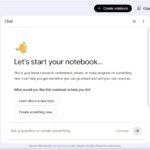
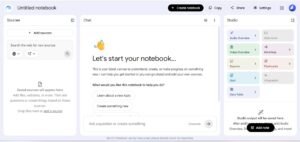
3. NotebookLM — Best for Studying Notes and PDFs
NotebookLM is particularly useful for students who study from lecture notes, PDFs, research papers, and other source materials.
You can provide supported sources and ask questions about them. NotebookLM can also help create study guides, summaries, and quizzes based on your materials. Learn more about NotebookLM
For example:
Upload your lecture notes → ask for a study guide → generate practice questions → review the topics you find difficult.
This makes NotebookLM especially useful during exam preparation.
Best for: Lecture notes, PDFs, revision, study guides, and source-based learning.
If you’re interested in AI note-taking, also read our guide to AI Note-Taking Tools for Students.
4. Perplexity — Best AI Tool for Research
Perplexity is designed to answer questions while providing sources you can investigate further.
College students can use it to explore research topics, find background information, compare ideas, and discover useful sources.
However, don’t blindly copy information or citations generated by any AI tool. Open the sources and verify important facts before using them in academic work.
Best for: Research, source discovery, and exploring unfamiliar topics.
For more research-focused AI tools, see our guide to Best LLMs for Research Papers.
5. Claude — Best for Writing and Complex Explanations
Claude can be useful when students are working with long documents or need detailed explanations.
You can use it to understand difficult reading materials, brainstorm essay ideas, organize arguments, and review your own writing.
A useful approach is to ask for feedback rather than to ask AI to write your entire assignment.
For example:
“Review my paragraph and identify unclear arguments. Don’t rewrite it for me.”
This approach allows you to improve your own writing while using AI as a learning assistant.
Best for: Writing feedback, brainstorming, long documents, and explanations.
6. Grammarly — Best for Grammar and Proofreading
Grammarly helps students improve grammar, spelling, punctuation, clarity, and writing style.
It’s useful for essays, reports, emails, applications, and other academic writing.
A good workflow is simple:
Write your own draft → Check it with Grammarly → Review the suggestions → Make your own final edits
This keeps the writing process in your hands while helping you catch mistakes.
Best for: Grammar, proofreading, clarity, and writing improvement.
7. Canva — Best for Presentations and Visual Projects
College students often need to create presentations, posters, infographics, and other visual projects.
Canva provides templates and AI-powered features that can speed up the design process. Explore Canva
You can use it to create:
- Presentation slides
- Infographics
- Posters
- Project visuals
- Study diagrams
Always review AI-generated text and visuals before using them in an academic project.
Best for: Presentations, posters, infographics, and visual assignments.
8. Wolfram Alpha — Best for Math and Science
Wolfram Alpha can be useful for students studying mathematics, physics, engineering, and other STEM subjects.
It can help with calculations, equations, graphs, and mathematical concepts.
Instead of using it only to get an answer, try solving a problem yourself first and then use the tool to check your result.
Best for: Mathematics, calculations, equations, and STEM subjects.
9. Quizlet — Best for Flashcards and Exam Revision
Quizlet can help students create and use flashcards for revision.
Flashcards are useful for vocabulary, definitions, formulas, key concepts, and other information that requires memorization.
A simple study workflow is:
Notes → Flashcards → Practice → Find weak areas → Review
This can make exam preparation more organized and focused.
Best for: Flashcards, memorization, revision, and exam preparation.
10. Notion — Best for Organizing Study Life
Notion can help students organize notes, assignments, projects, deadlines, and study plans in one workspace. Its AI features can also assist with summarizing and organizing information.
For example, you can create separate sections for:
- Course notes
- Assignment deadlines
- Research ideas
- Exam schedules
- Project tasks
- Revision materials
This is particularly useful if you’re taking multiple courses and need one central place to manage your academic work.
Best for: Note organization, planning, productivity, and study management.
Which of the Best Free AI Tools for College Students Should You Use?
You don’t need every AI tool available. Choose based on what you actually need.
| Your Goal | Recommended Tool |
|---|---|
| Understand a difficult topic | ChatGPT |
| Study from your own PDFs | NotebookLM |
| Research a topic | Perplexity |
| Improve writing | Claude or Grammarly |
| Create presentations | Canva |
| Check math problems | Wolfram Alpha |
| Make revision flashcards | Quizlet |
| Organize notes and deadlines | Notion |
| Work with Google’s ecosystem | Gemini |
For most students, a small combination of ChatGPT, NotebookLM, Perplexity, and one writing or productivity tool is enough.
Still in high school? Check out our guide to the Best AI Tools for High School Students.
How to Use AI Tools for College Without Cheating
AI can be extremely useful for education, and the best free AI tools for college students can support learning when they are used responsibly.
Instead of asking:
“Write my entire assignment for me.”
Try:
“Explain this topic and give me questions that will help me develop my own answer.”
You can use AI to:
- Explain difficult concepts
- Generate practice questions
- Review your own writing
- Brainstorm research ideas
- Summarize your own notes
- Create study plans
- Test your understanding
However, always verify important information. AI tools can make mistakes, produce inaccurate information, or provide unreliable citations.
Most importantly, follow your college or university’s rules regarding AI-generated content.
Are Free AI Tools Enough for College Students?
The best free AI tools for college students can handle many everyday academic tasks without requiring multiple paid subscriptions.
For many students, yes.
You don’t necessarily need several expensive AI subscriptions. A combination of free tools can cover many everyday student needs.
For example:
ChatGPT → explanations and brainstorming
NotebookLM → lecture notes and PDFs
Perplexity → research
Grammarly → writing improvement
Canva → presentations
The best tool combination depends on your course, workload, and study style.
Frequently Asked Questions
Choosing the best free AI tools for college students depends on what you need help with. Some tools are better for studying and research, while others are designed for writing, presentations, or productivity.
What is the best free AI tool for college students?
ChatGPT is one of the best all-purpose options because it can help with studying, explanations, brainstorming, writing feedback, coding, and practice questions.
What is the best AI tool for studying?
NotebookLM is particularly useful when you want to study from your own lecture notes, PDFs, and other source materials. ChatGPT is also useful for explanations and practice.
Which AI tool is best for research?
Perplexity is a useful starting point for research because it provides sources that you can investigate. However, students should always verify important information using the sources.
Can college students use AI for assignments?
It depends on the rules of the college, university, instructor, or course. Students should check their institution’s AI policy before using AI-generated content in assignments.
Are free AI tools safe for students?
Free AI tools can be useful, but students should avoid sharing sensitive personal information or confidential academic materials. Always review the privacy policies and terms of the services you use.
Final Verdict
The best free AI tools for college students aren’t necessarily the tools with the most features. The best tools are the ones that solve real problems in your daily academic life.
Best overall: ChatGPT
Best for notes and PDFs: NotebookLM
Best for research: Perplexity
Best for writing: Claude and Grammarly
Best for presentations: Canva
Best for math and science: Wolfram Alpha
Best for revision: Quizlet
Best for organization: Notion
Best for Google users: Gemini
Used correctly, these tools can save time, improve productivity, and help you understand difficult subjects more effectively.
These best free AI tools for college students can help you study smarter, research more efficiently, and stay organized throughout college.
The key is simple: use AI as a learning assistant—not a replacement for learning.
If you also want to learn more about artificial intelligence, check out our guide to Free Stanford AI Courses Online
About The Author